
IT Incident Management — Autotask, Webroot & Datto RMM
Live incident triage at MIDRANGE GROUP: Autotask ticketing, Datto RMM remote access, and Webroot false-positive resolution.
Context
At MIDRANGE GROUP, within the Support Technique team alongside the team's systems & network administrator, I handled support requests for managed clients, received across three intake channels: direct phone calls to the support line, email to the support address, and automatic alerts raised by the Datto RMM agent installed on client endpoints.
Once a ticket is opened in Autotask, it is routed either to the Support Technique team (user-facing incidents) or to the Exploitation team (infrastructure and monitoring). Here's how I handled a live client ticket from intake to resolution.
Technical challenges
- Tickets arrive through three different channels (phone, email, Datto RMM alerts) with three different levels of detail, so the first job on every ticket is filling the gaps before any real diagnosis starts.
- A support ticket has to be routed correctly on first read — user-facing issues go to Support Technique, infrastructure issues go to Exploitation — and a misrouted ticket costs time on both sides.
- Reproducing the exact symptom remotely, before touching any configuration, is the only way to avoid changing the wrong setting on a live client machine.
- A security tool flagging a legitimate site as malicious (Webroot false positive) looks identical to a genuine block from the user's side — telling the two apart requires checking the domain's actual reputation, not just trusting the alert.
- Every fix has to be documented in Autotask well enough to double as both a billing record and a future troubleshooting reference — writing a vague ticket note creates work for the next technician.
How tickets reach the support team
- Phone: client calls the support line directly. The technician creates a ticket in Autotask manually and begins triage immediately.
- Email: client sends a message to the support address. Autotask ingests it automatically and creates a ticket, which is then assigned to the correct queue.
- Datto RMM agent: the agent installed on managed endpoints monitors the device in real time and can raise alerts automatically (CPU spike, disk full, security event). These generate tickets in Autotask without any client action.
Incident resolution — step by step
- 1Step 1 — Ticket received in AutotaskA client reported being unable to access a specific website. Webroot was displaying a 'site blocked' warning on their machine. The ticket was assigned to me, with Théo on hand for support.
- 2Step 2 — Remote access via Datto RMMWe contacted the client and requested permission to take remote control of their workstation via Datto RMM. This allowed us to reproduce the issue in real time, see the exact Webroot warning message, and confirm which URL was being blocked.
- 3Step 3 — Diagnosis: Webroot false positiveAfter inspecting the blocked URL, we determined it was a legitimate business site incorrectly flagged by Webroot's threat intelligence. The site was not malicious — Webroot had classified it as suspicious based on its domain reputation score.
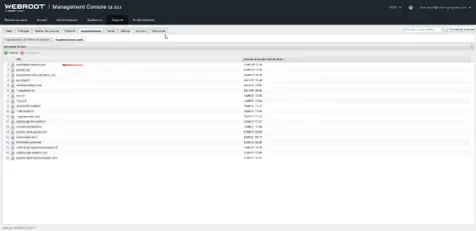
- 4Step 4 — URL suppression in Webroot Management ConsoleWe connected to the Webroot Management Console (CE 23.2) and navigated to the URL suppression list under the client's policy. We added the blocked domain to the suppression (whitelist) list. The change propagated to the client's endpoint within minutes, and the site became accessible without any further intervention on the machine.
- 5Step 5 — Resolution logged in AutotaskA time entry was created in Autotask with a summary of the issue, the root cause (false positive), and the resolution steps taken. The ticket was closed as 'Complete'. The time worked was recorded for client billing and used as part of the audit trail.
Impact
Incident resolved in a single session, entirely remote, with no onsite trip and no software reinstall on the client's machine.
Key figures
Best Practices
- Webroot false positives on legitimate business sites are a recurring support scenario: the first reflex should always be to check the URL suppression list before escalating or reconfiguring the endpoint.
- Datto RMM remote access eliminates the need for on-site visits for most user-facing incidents, reducing resolution time significantly.
- Autotask time entries are not optional: they serve as both a billing record for the client and a searchable knowledge base for recurring issues.
- Routing matters: distinguishing between a Support Technique ticket (user-facing) and an Exploitation ticket (infrastructure) from the first description saves time and avoids wrong-team assignments.
- Always reproduce the issue remotely before touching any configuration — confirming the exact symptom prevents premature or incorrect changes.
Known Limitations & Decisions
- This case covers a single, representative ticket end to end rather than the full volume of tickets I handled — the workflow described (intake → remote access → diagnosis → fix → documentation) is the one applied to every ticket, at different depths depending on complexity.
- URL suppression in the Webroot console fixes the immediate symptom for the reported domain; it does not retrain Webroot's underlying reputation scoring, so a similar false positive can recur on a different URL — that's a vendor-side limitation, not something fixable from the console.
- Remote resolution via Datto RMM assumes the client machine is reachable and the user available to grant access; a ticket where either condition fails would need an on-site visit, which falls outside the Support Technique workflow described here.
- Routing between Support Technique and Exploitation was based on the description at intake, which is a judgment call — a ticket that looks user-facing at first (like this one) can still turn out to have an infrastructure root cause, and vice versa.
Tools used
Screenshots